
Our own product, in use today
DigiDocSmart
Every document read, filed and accounted for.
One secure place for every record. It reads the data out of scans, routes documents for approval, and keeps a verifiable record of who did what. Runs on our cloud, or entirely inside your own network.
- DPDP Act ready
- Retention, breach register, logs
- Hash-chained
- Audit trail you can verify
- 4 levels
- Public to Restricted classification
- Cloud or on-prem
- Same product, either way
What it is
Four layers. Most systems give you the first two and stop.
Plenty of tools store documents and let you make folders. Far fewer route a document for approval and then hand you evidence that stands up in an audit. That gap is the reason DigiDocSmart exists.
- 01Store and share
Department folders, four classification levels, version history, and share links with a password and an expiry date.
See this screen - 02Extract data
OCR and AI read the fields you define from scans and PDFs. Export them to Excel, CSV or PDF.
See this screen - 03Route approvals
Multi-step workflows by role or person, with delegation and timeouts.
See this screen - 04Prove every action
A tamper-evident, hash-chained audit trail you can verify at any time.
See this screen
A walk through it
Real screens, not marketing renders.
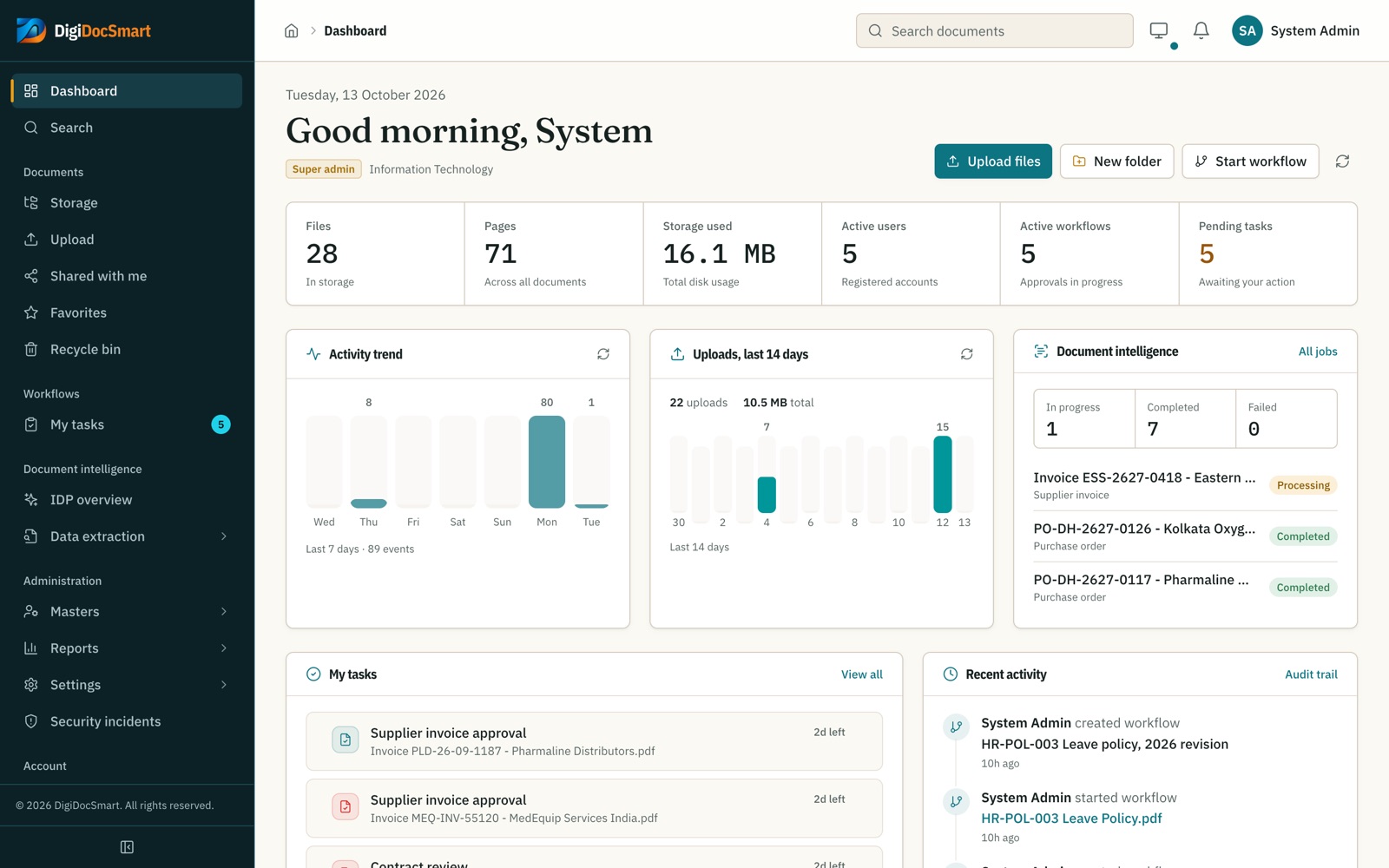
Taken from a demo workspace for a hospital group: supplier invoices, purchase orders, contracts, SOPs and HR policies, with approvals in flight. Pick a screen, or use the arrows.
Everything waiting on you, on one screen.
- Files, pages and storage at a glance
- Approvals waiting on you, with days left
- Upload activity and the latest audit events
Built for
Set up the way your sector files things.
The same product, configured with the folders, classifications and extraction fields that each kind of organisation actually uses.
Classify patient records Confidential so only their department can open them. Every view and download is recorded.
- Patient files
- Lab reports
- Consent forms
- Insurance claims
- Discharge summaries
DPDP Act 2023 · Rules 2025
Ready for India’s data protection law.
DigiDocSmart supplies the controls the Act expects of a data fiduciary. Consent notices and data-principal requests stay with your own process.
Erase on time
Retention policies purge personal data once its purpose ends.
Logs that hold up
Every view and download recorded, tamper-evident, kept five years.
Breach register
Log and track a breach from discovery to closure.
Reasonable safeguards
Classification-based access, two-factor sign-in, backups.
Deployment
Our servers, or yours. Pick on facts, not fear.
On-premises is not automatically safer. It moves the responsibility to your team. Here is the honest comparison so the choice is made on requirements.
| Cloud (SaaS) | On-premises | |
|---|---|---|
| Time to first login | Same day | 2–4 weeks |
| Where your files sit | Our managed cloud | Your servers, your network |
| Updates | We handle them | Scheduled with your IT |
| Backups & uptime | Our responsibility | Your infrastructure team |
| Works offline / air-gapped | ||
| Data never leaves your country | Region of your choice | |
| Typical fit | Under 500 users, no data-residency rule | Regulated, or a hard data-residency rule |
Both options run the same codebase. You can move from one to the other later.
Questions we are asked
Before you book a walkthrough.
Can we bring the files we already have?
Yes. Upload whole folders with their structure intact; uploads continue in the background and duplicates are detected by fingerprint. For large shared drives we do the migration with you and map old folders to departments and classifications.
We still have paper. Can you help with that too?
That is where Diginathi started. Our digitization team scans, indexes and loads archives straight into DigiDocSmart, so you are not left with a folder of unnamed PDFs.
Does it work with our ERP or HR system?
It has an API for uploads, search and workflow events, so documents can arrive from your ERP and approvals can update it. If you want AI working across both systems, that is a project our engineers take on.
Can it read scanned documents?
Yes. Scans are OCR’d so their text is searchable, and extraction templates pull specific fields out of invoices, certificates and forms. Low-confidence fields are held for a person to check.
Who can see what?
Each file has a department and one of four classification levels. Roles decide what a person can do; classification decides what they can open. Two-factor sign-in can be required.
How is it priced?
By the number of users and the deployment you choose, cloud or on-premises. Tell us your team size and document volume on a walkthrough and we will send a written quote.
Want documents and AI working inside your existing ERP instead? AI for existing systems
Try it
See it with your own documents in it.
Bring three real files and the approval route you use today. In half an hour you will know whether this fits, which is more than any brochure can tell you.